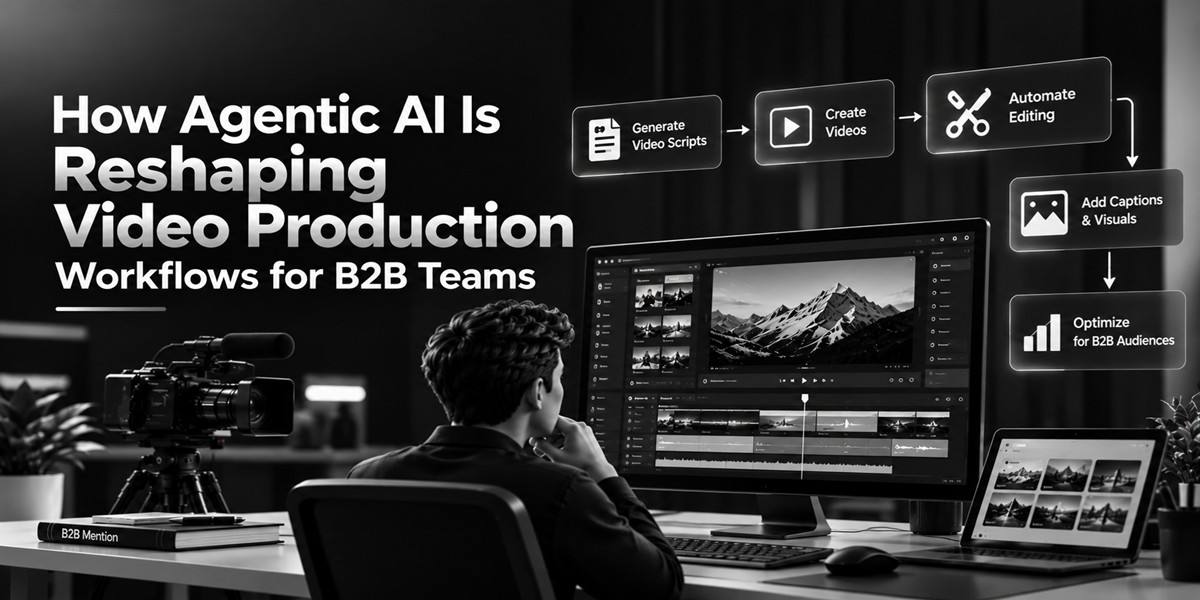

TL;DR: B2B video teams are moving from tool-by-tool editing toward agentic workflows that can handle connected production tasks from a single brief. An agentic video editor can review footage, build first cuts, remove unwanted sections, create versions, and respond to revisions while keeping humans in control. The result is a workflow built around delegation and review, rather than repetitive manual operations.
Introduction
A B2B video can take hours to produce even when the final piece is only a few minutes long. Teams must review footage, find useful takes, remove mistakes, build a rough cut, add captions, adjust pacing, and then create versions for different channels.
That process is changing as AI moves beyond individual editing features. Instead of asking AI to perform one action at a time, teams can increasingly describe an outcome and let an AI system handle several connected steps.
This is where an agentic video editor becomes useful. An AI agent can take a broader editing task, work through the required operations, and return an editable result for a person to review.
The shift matters for B2B teams because video production often involves repeated formats. Product demos, customer interviews, webinars, sales videos, training content, and social clips can all require similar editing work.
This article explains how agentic AI changes that workflow, where it can save time, what teams should automate, and where human judgment still matters.
What makes an AI video editor agentic?
An agentic video editor can take a broader editing objective and perform multiple connected actions instead of handling only one isolated task. The user gives direction, the agent works through the editing steps, and the result remains available for human review and changes.
A normal AI editing feature might remove silence, generate captions, or improve audio. These features can be useful, but the user still manages the overall workflow.
An agentic workflow works at a higher level.
For example, a B2B marketer could ask:
“Build a three-minute first cut from these customer interviews. Remove false starts, keep the strongest answers, and leave space for product B-roll.”
The agent can then break that request into smaller editing operations. It may review the footage, identify useful sections, remove unwanted parts, and assemble a rough cut.
The important distinction is delegation. The user isn’t simply choosing an AI button. They’re assigning a job.
Google Cloud describes AI agents as systems that can pursue goals and complete tasks on a user’s behalf, with capabilities such as reasoning, planning, and acting across workflows.
In video production, that idea translates into an editing process where the human defines the goal and the AI handles more of the operational work.
Which video tasks can AI agents handle?
AI agents are most useful when a video workflow contains repetitive, connected tasks that follow clear instructions. These can include footage review, first-draft assembly, silence removal, take selection, multicam syncing, restructuring, versioning, and other routine editing operations.
Consider a B2B webinar with three speakers and several hours of footage. A traditional workflow might require an editor to watch the recordings, mark useful sections, sync cameras, remove pauses, and build the first assembly.
An agentic video editor can take on much of that preparation.
Common tasks include:
- Reviewing long recordings
- Finding specific people, moments, or scenes
- Removing filler words and long pauses
- Selecting usable takes
- Building rough cuts
- Reordering sections
- Adjusting pacing
- Creating shorter versions
- Preparing platform-specific cutdowns
- Handling captions and other repetitive edits
- Supporting localization workflows
The goal isn’t to remove every human decision. It’s to reduce the amount of time editors spend performing predictable operations.
That distinction is important because creative editing still depends on context. A technically clean cut isn’t automatically the right cut for a customer story or product launch.
Why does this matter for B2B teams?
B2B teams often need one recording to produce several useful assets. A webinar might become a long-form video, short clips, sales enablement content, social posts, and training material.
The challenge is not always creating the original footage. It’s turning that footage into multiple finished assets without repeating the same manual work.
For example, imagine a SaaS company records a 45-minute product webinar. The team could need:
- A polished full-length recording
- Three short educational clips
- A customer-focused product section
- A sales enablement version
- A social cutdown
- A captioned version for silent viewing
An agentic workflow can make these transformations more connected. Once the project context and source material are available, the team can give instructions for different versions instead of rebuilding each one from scratch.
This approach also supports faster revision cycles. If a stakeholder asks for a shorter introduction or a different ending, the team can direct the editing system toward that change and then review the result.
That makes video production less about repeating operations and more about directing outcomes.
From manual editing to delegated workflows
The biggest workflow change is the move from operation-based editing to outcome-based editing.
In a traditional workflow, an editor might think:
Find the clip. Cut it. Remove the pause. Move the clip. Add B-roll. Adjust the timing.
In an agentic workflow, the instruction can be closer to:
“Make this section tighter and use the strongest customer response.”
The agent then determines which editing operations are needed.
This doesn’t mean the editor gives up control. In fact, the value of an agentic video editor depends heavily on keeping the result editable.
Invideo editor follows this model by allowing users to describe editing work in plain language while the resulting changes are placed on a multitrack timeline that users can continue to modify.
For a B2B team, that can create a useful middle ground between full manual editing and one-click video generation.
The AI handles repetitive production work. The editor still controls the final story.
For teams exploring the broader shift from simple prompts toward connected production tasks, this agentic AI video workflow guide explains how project context and specialized AI agents can work together across multiple stages of production.
Where should humans stay in control?
AI can handle many production tasks, but B2B video still needs human judgment. Editors and content teams understand the audience, brand, message, context, and business goal behind the footage.
An agent might identify a strong customer statement. A human still needs to decide whether that statement supports the main story.
The same applies to tone. A faster cut may be technically correct but feel too aggressive for a detailed product explanation. A shorter clip may perform well as social content but remove context that matters to a buyer.
A practical workflow is therefore:
Brief → delegate → review → revise → approve
The first step gives the agent enough context. Delegation removes repetitive work. Review catches mistakes or weak creative choices. Revision handles changes. Approval keeps accountability with the human team.
Invideo editor is designed around this type of interaction. Its agents can work on tasks such as take selection, first-draft assembly, multicam editing, restructuring, color work, sound, and versions, while the resulting work remains editable on the timeline.
Teams can also use AI video editing workflows for more focused editing tasks when a full agentic workflow isn’t necessary. The right approach depends on how much of the production process needs to be delegated.
Building an agentic workflow for B2B video
A good starting point isn’t automation for its own sake. Start with the parts of production that consume time but don’t require many creative decisions.
1. Identify repetitive work
Look at the last few videos your team produced. Track tasks such as footage review, cutting pauses, creating versions, caption preparation, and basic restructuring.
2. Define the desired outcome
Instead of asking an agent to perform isolated actions, explain what the finished section should achieve.
For example:
“Turn this 20-minute customer interview into a two-minute case-study segment focused on the customer’s original problem and measurable outcome.”
3. Give useful project context
Include the target audience, video length, tone, important sections, brand requirements, and anything the agent must preserve.
Clear instructions reduce unnecessary revisions.
4. Review the first result
Check the story, facts, pacing, speaker selection, continuity, and brand fit. AI can speed up production, but review remains part of the workflow.
5. Create reusable processes
Once a workflow works well, turn it into a repeatable process. For example, a team could create a standard workflow for webinars, customer interviews, product updates, or sales videos.
This is where an agentic video editor can become more useful over time. The value isn’t only in one faster edit. It’s in creating a more repeatable production system.
What changes for video editors?
Agentic AI doesn’t necessarily make the editor less important. It changes where the editor spends time.
Instead of spending most of the day searching through footage or making the same adjustment across dozens of clips, an editor can spend more time on story, pacing, visual choices, and final quality.
That doesn’t mean every task should be delegated. Editors should keep close control over decisions that affect meaning, emotion, brand identity, and accuracy.
For example, AI may find five possible takes of a product statement. The editor can decide which performance feels most natural and whether the surrounding shots support it.
The same principle applies to AI-generated content. An AI video creation workflow can speed up production, but people still need to check the result before publishing.
The most useful mental model is not “AI replaces the editor.” It’s “AI takes on more of the production workload while the editor directs the work.”
What should B2B teams do next?
B2B teams don’t need to rebuild their entire video process around AI overnight. Start with one repeatable workflow, such as webinar repurposing or customer interview editing, and measure where manual work is being reduced.
Video remains a major part of marketing. Wyzowl’s 2026 survey found that 91% of businesses surveyed use video as a marketing tool, while 63% of surveyed video marketers said they had used AI video tools to create or edit marketing videos. The survey covered 266 respondents in late 2025, so these figures should be viewed as survey results rather than universal industry measurements.
For teams handling regular video production, the practical question is which parts of the workflow are repetitive enough to delegate.
An agentic video editor can be one option when the work involves connected editing tasks rather than a single automated action. Invideo editor is one example of this approach, combining AI-assisted editing with a timeline that users can continue to control.
Teams interested in testing this workflow can start creating with Invideo editor and see how delegated editing fits into their existing process.
The bigger shift is not simply from manual editing to AI editing. It’s from managing every operation yourself to directing a workflow, reviewing its output, and spending more time on decisions that require human context.
What part of your B2B video workflow would you delegate first if the repetitive work could be handled for you?
FAQs:
What is an agentic video editor?
An agentic video editor is an editing application that uses AI agents to complete broader editing assignments. Instead of running one AI feature at a time, users can give an outcome-focused instruction and let the agent perform several connected operations. The resulting work should remain editable so the user can review, change, or undo the agent’s decisions.
How is agentic editing different from normal AI video editing?
Traditional AI video editing often focuses on individual functions such as captions, silence removal, background removal, or audio enhancement. Agentic editing works at the assignment level. The user describes a broader objective, and the agent determines the sequence of operations needed to complete it.
Can AI agents edit long B2B recordings?
Yes, AI-assisted workflows can help teams work through long recordings by identifying relevant moments, selecting takes, removing unwanted sections, and building an initial edit. The result should still be reviewed by a person because important context, performance choices, and story decisions may not be obvious from automated analysis alone.
Does agentic video editing remove the need for editors?
No. Agentic editing changes which tasks editors handle rather than removing the need for human judgment. Editors still decide what the story should communicate, which performances work, whether the pacing feels right, and whether the final video matches the project’s goals.
What B2B videos are suitable for agentic workflows?
Repeated formats are often a practical starting point. These include webinars, customer interviews, product demonstrations, training videos, internal updates, social cutdowns, and sales enablement videos. They tend to contain recurring production tasks that can be described clearly and reviewed against a consistent set of requirements.
Can an agentic video editor create multiple versions?
An agentic video editor can support versioning by restructuring an existing project for different lengths, audiences, or platforms. The exact workflow depends on the editing system. For example, Invideo editor describes support for cutdowns, dubs, and platform formats while keeping the project editable.
Should B2B teams automate the entire video workflow?
Not necessarily. A better starting point is to automate repetitive work while keeping creative and business decisions under human control. Teams can test one workflow, review the results, identify where the agent performs well, and gradually expand automation where it produces reliable benefits.